
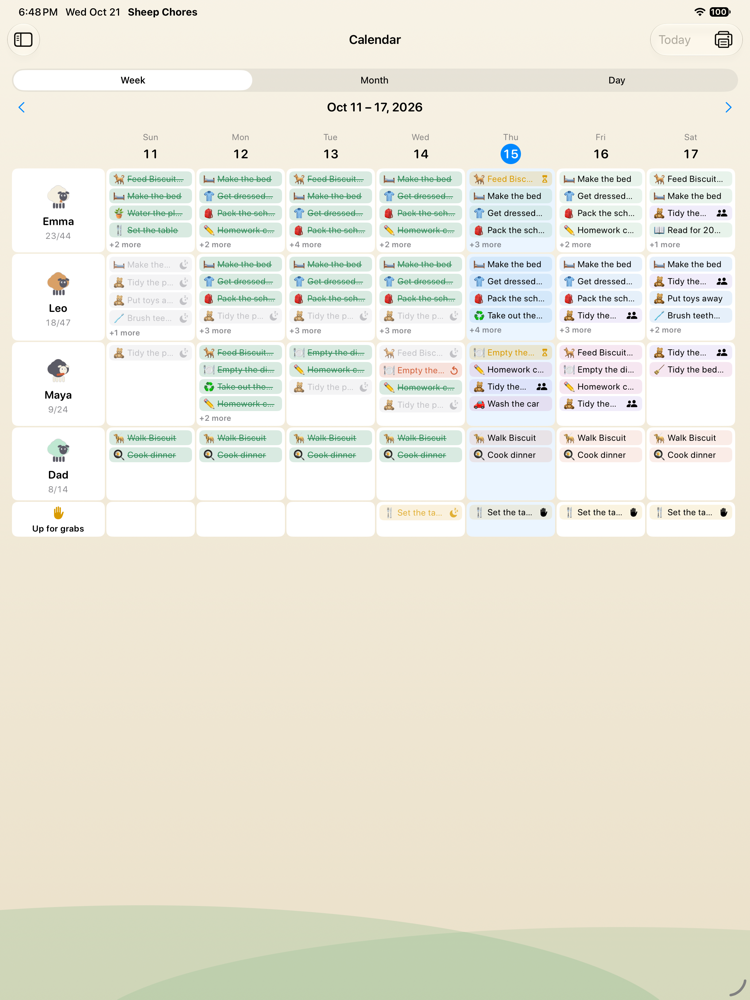
Week, month, day
- Week: a grid of kids by days. On an iPad each cell lists the chores; on an iPhone the grid turns sideways — days down, kids across — with a ring per cell. Weeks page left and right; Today jumps back.
- Month: one dot per kid per day in the kid's colour — filled when everything was done, hollow when some was, grey when assigned, none on a rest day. Tap a day to open it.
- Day: everything in full, grouped by kid, with swipe to approve or send back, and + Add chore for this day for one-offs.
A chore from the calendar
Tap any chip and a sheet shows the chore for that kid on that day: approve it, send it back, excuse it with a reason (which waives a penalty), add a bonus, mark a team chore done for everyone, or put it back to to-do. Routines show their steps on the routine's days.
The kids' calendar
Kids get the same calendar on their side, read-only, from the bottom of their board. Knowing that Thursday has the recycling run is half of not forgetting it.
Print the week
Calendar › Print the week lays the grid out as a one-page sheet — kids down the side, days across the top, a box per chore — for families who still like a pen on the fridge. The fridge chart is the digital version that answers back.
Trends and fairness
Reports draw a twelve-week completion trend per kid, so you can see whether the system is working or quietly fading, and a fairness table shows who was assigned what and who did it — useful when a chore takes turns and someone claims it never lands on them.
Repeating chores, correctly
The calendar is generated from each chore's schedule, so a chore that repeats every three days, every other Saturday or on the 31st of the month (which becomes the 30th in April and the 28th in February) lands on the right day two months out. Daylight-saving changes do not shift a day; the app does its date arithmetic by calendar day, not by hours.
Questions
Can I see just one kid?
Yes: open the kid's page for their own board and history, or filter the day view. The week grid is deliberately everyone at once.
Does it sync with Apple Calendar?
No. The chore calendar lives inside Sheep Chores, where it can show status, approvals and rewards. Reminders before a chore is due arrive as notifications.
Can I add a one-off chore for Saturday?
Yes. Open Saturday in day view and tap + Add chore for this day; the chore is created with a once schedule on that date.